
DevOps Explained in Simple Words (A Complete Beginner Guide)

DevOps often feels confusing at first.
You watch videos.
You read blogs.
You see people talking about Docker, Kubernetes, CI/CD, cloud, monitoring.
Very quickly, everything starts to feel heavy and overwhelming.
If you feel lost, this article is for you.
In this post, I will explain what DevOps really is, why it exists, and how the full DevOps flow works, using simple words and real-life thinking, not buzzwords.
Why DevOps Exists
To understand DevOps, we first need to understand the problem it was created to solve.
Earlier, software teams worked like this:
Developers wrote code
Operations teams handled servers and deployments
They worked separately.
When something broke:
Developers said: “The code is fine.”
Operations said: “The server is fine.”
This caused:
Slow software releases
Bugs reaching users
Long nights fixing issues
Stress and blame between teams
Everyone was working hard, but the process was broken.
DevOps was created to fix how people work together, not just how software is built.
What DevOps Really Means
DevOps is not a tool.
DevOps is not a job title.
DevOps is not Docker or Kubernetes.
DevOps means:
Building, testing, releasing, and running software together in a smooth and reliable way.
It focuses on:
Teamwork
Clear processes
Automation where possible
Fast feedback when something goes wrong
At its heart, DevOps is about making software delivery boring and predictable — and that’s a good thing.
The Big Picture: The DevOps Flow
Let’s walk through the full DevOps flow, from writing code to running software in production.
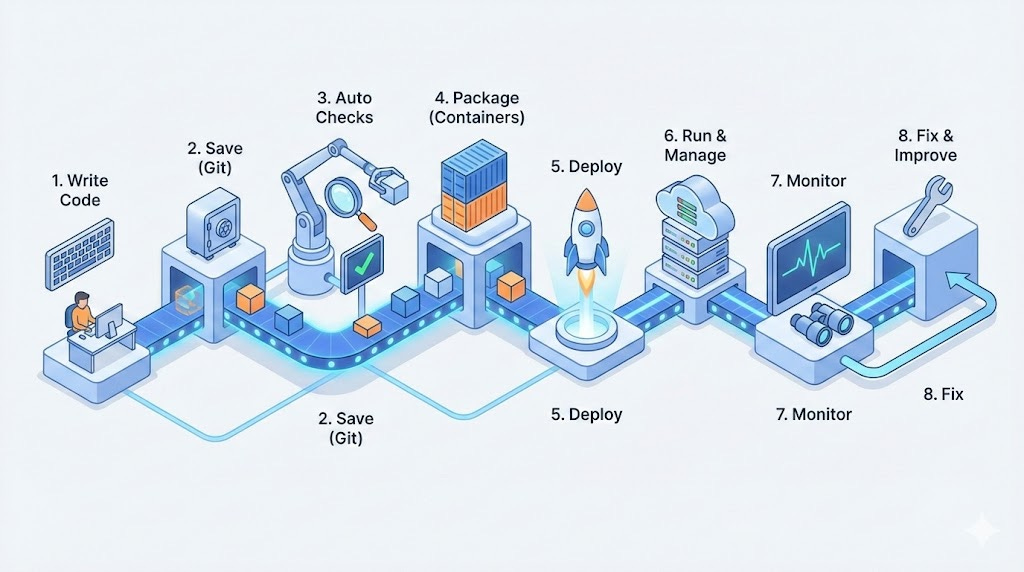
This is how DevOps works in real life.
Step 1: Writing Code
Everything starts with code.
A developer:
Writes a small feature
Fixes a bug
Improves something
In DevOps, the rule is simple:
👉 Make small changes, not big risky ones.
Small changes are:
Easier to test
Easier to fix
Safer to release
Step 2: Saving Code Safely (Version Control)
Instead of sending code on WhatsApp or email, teams use Git.
Git helps to:
Save code history
Track who changed what
Roll back if something breaks
Work together without overwriting each other
Think of Git as:
A time machine for your code
Every change is saved, tracked, and recoverable.
Step 3: Automatic Checks and Tests
Once code is saved, DevOps does something important.
It checks the code automatically.
These checks can include:
Does the code run?
Does it break anything?
Does it follow basic rules?
This step is important because:
Humans miss mistakes
Computers don’t get tired
Finding problems early saves time and stress later.
Step 4: Packaging the Application
Now the code needs to run somewhere.
But there’s a problem.
Code that works on one machine may fail on another because:
Different software versions
Different settings
Different environments
This is where containers come in.
Containers package:
The app
The settings
Everything it needs to run
So the app runs the same everywhere.
You don’t need to understand containers deeply at first.
Just remember this:
👉 Containers remove “it works on my machine” problems.
Step 5: Deploying the Application
Deployment means:
Sending your app to a server so users can access it
In DevOps:
Deployment is automated
No manual copying of files
No guessing
Automation helps because:
It’s faster
It’s repeatable
It reduces mistakes
If a deployment fails, the system tells you immediately.
Step 6: Running and Managing the App
Once the app is live, the job is not finished.
Now we need to:
Keep it running
Handle traffic
Restart it if it crashes
Update it without downtime
This is where orchestration tools help.
You don’t need to master them on day one.
The idea is simple:
👉 The system should manage apps for us, not the other way around.
Step 7: Monitoring and Watching the System
Good DevOps teams don’t wait for users to complain.
They watch their systems.
Monitoring helps answer questions like:
Is the app running?
Is it slow?
Is something failing?
Logs help answer:
What went wrong?
When did it happen?
Why did it happen?
This visibility helps teams:
Fix issues faster
Learn from mistakes
Improve over time
Step 8: Fixing Problems and Improving
Problems will happen.
This is normal.
DevOps does not mean “no failures”.
DevOps means:
Detect problems early
Fix them quickly
Learn from them
Improve the process
Every issue becomes a lesson, not a disaster.
Where Cloud Fits In
Cloud platforms provide:
Servers
Storage
Networking
Instead of buying hardware, teams:
Create resources in minutes
Scale when needed
Pay for what they use
Cloud makes DevOps faster and more flexible, but it is not required to understand DevOps basics.
A Common Mistake Beginners Make
Many beginners:
Jump straight into tools
Try to learn everything at once
Memorize commands without understanding
This leads to confusion and burnout.
The better approach:
Learn the flow first
Understand why each step exists
Then learn tools slowly
How You Should Start Learning DevOps
If you are new, start simple:
Learn basic Linux commands
Learn how Git works
Run a small app locally
Add one automation step
Improve step by step
Even 20 minutes a day is enough if done consistently.
Final Thoughts
DevOps is not about being fast all the time.
It is about being safe, calm, and consistent.
When the process is clear:
Teams stress less
Software improves
Learning becomes easier
If DevOps ever feels confusing, zoom out and look at the flow again.
Everything makes sense when you see the full picture.
👉 In the next article, we will start from the very beginning: Linux explained simply, so you understand what actually runs your applications.
If you want to learn DevOps the practical way, step by step, subscribe to this newsletter and learn with clarity, not chaos.